

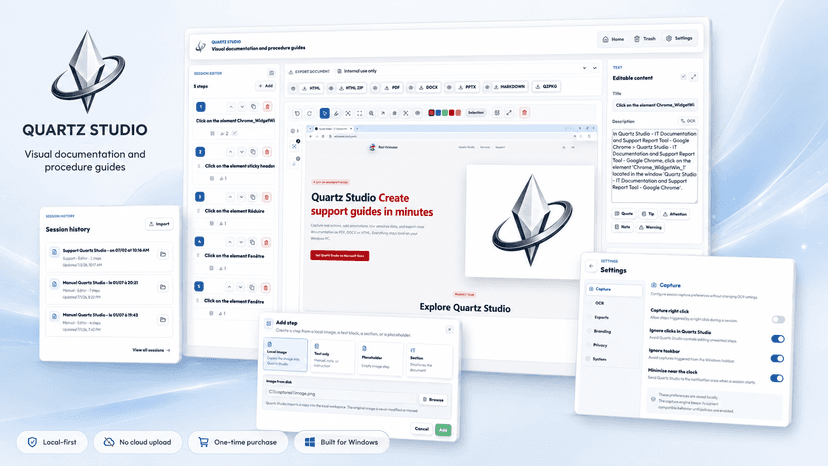
Quartz Studio — Product Description
Create clear visual documentation faster
Quartz Studio is a desktop application designed to help professionals create clean, structured, and easy-to-follow visual documentation with less effort.
It is built for people who need to document software workflows, create tutorials, report bugs, prepare training materials, or deliver step-by-step guides without spending hours on repetitive manual work.
Instead of taking screenshots one by one, organizing files manually, writing explanations in another tool, hiding sensitive information afterward, and formatting everything from scratch, Quartz Studio gives users a smoother workflow for creating professional documentation.
What Quartz Studio helps you do
With Quartz Studio, users can:
Capture important steps from a workflow.
Organize screenshots into a clear sequence.
Add explanations and context to each step.
Hide or blur sensitive information before sharing.
Create cleaner support, QA, training, and client-facing documents.
Export documentation that is easier to understand and reuse.
Save time on repetitive documentation tasks.
The goal is simple: document better, faster, and with less friction.
Main use cases
Quartz Studio is useful for creating:
User guides for software, tools, or platforms.
Internal procedures for teams and operations.
Software tutorials based on real screen actions.
QA reports with clear bug reproduction steps.
Support documentation to help customers faster.
Training materials for teams, clients, or students.
Client handover documents after setup, configuration, or delivery.
Technical notes for troubleshooting and implementation.
Built for clarity and privacy
Visual documentation is often easier to follow than long text instructions, especially when explaining software interfaces, dashboards, settings, forms, or technical workflows.
Quartz Studio helps transform screen actions into a logical step-by-step guide, making the final document easier to understand for customers, teammates, QA testers, support agents, developers, trainers, consultants, and non-technical users.
Screenshots can also contain sensitive information such as emails, customer names, internal dashboards, IDs, financial data, login details, or confidential business information. Quartz Studio helps users prepare safer documentation by allowing sensitive areas to be hidden or blurred before sharing.
Who it is for
Quartz Studio is a strong fit for:
Freelancers.
Startups.
Small businesses.
IT teams.
QA testers.
Customer support teams.
Product teams.
Software companies.
Trainers.
Consultants.
Agencies.
Technical writers.
Lifetime license advantage
Quartz Studio is available on the Microsoft Store with a lifetime license option.
Users can purchase the application once and use it over time without a recurring monthly subscription. This makes it especially attractive for professionals and teams who want a practical desktop documentation tool with predictable costs.
Quartz Studio is more than a screenshot tool — it is a visual documentation assistant built to save time, improve clarity, and make knowledge easier to share.