






The Evolving Landscape of Visual Documentation
The digital age has ushered in an era where clear and concise communication is paramount, especially in fields that rely heavily on software interfaces and technical processes. Visual documentation, which combines text with images to create comprehensive guides, has emerged as a vital asset. Companies and individuals involved in software development, customer support, and training frequently find themselves needing to produce detailed visual documentation. This trend reflects a broader shift towards enhancing user experience and ensuring clarity in complex workflows. Yet, the creation of such documentation is often labor-intensive, demanding significant time and resources.
The Challenges of Traditional Documentation Methods
Creating effective visual documentation typically involves capturing screenshots, organizing them, annotating the images, and formatting the final document. This process is not only time-consuming but also prone to errors, such as missing steps or exposing sensitive information. Many professionals rely on disparate tools for capturing, editing, and compiling documentation, leading to inefficiencies and inconsistencies. As businesses increasingly prioritize agility and precision, the limitations of traditional documentation methods become more apparent, creating a demand for more integrated and streamlined solutions.
Innovative Solutions: The Rise of Integrated Documentation Tools
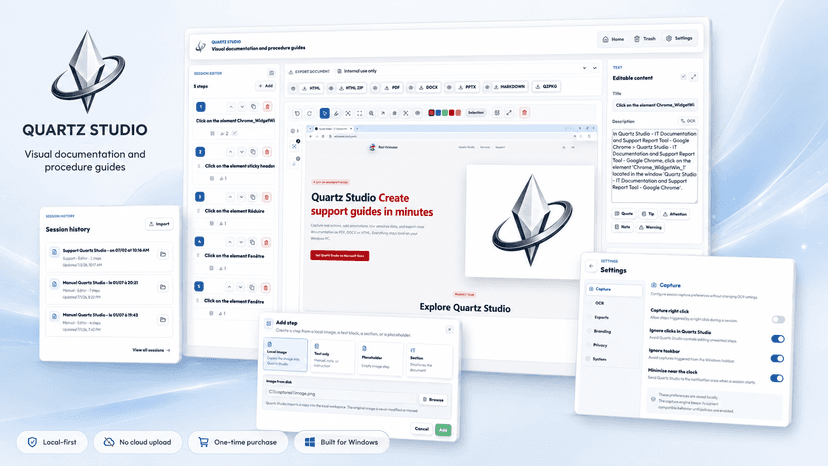
To address these challenges, a new generation of documentation tools is emerging. These tools aim to streamline the process by integrating various stages of documentation creation into a cohesive workflow. Quartz Studio exemplifies this trend by offering a desktop application that simplifies the creation of visual documentation. By enabling users to capture, organize, and annotate screenshots within a single platform, Quartz Studio helps professionals produce clear and structured documents with less effort. The tool is particularly valuable for those in software development, training, and customer support, where visual clarity is essential.
Quartz Studio in Action: Streamlining Documentation
Quartz Studio offers a practical workflow that enhances efficiency and clarity. Users can follow these steps to create professional documentation:
- Capture: Use Quartz Studio to capture each step of a software workflow or bug report. This eliminates the need to toggle between different tools.
- Organize: Automatically organize captured screenshots into a logical sequence, making it easier to follow the workflow.
- Annotate: Add explanations and context directly to each screenshot, ensuring that the documentation is informative and easy to understand.
- Secure: Utilize features to hide or blur sensitive information before sharing, safeguarding privacy and compliance.
- Export: Generate clean, reusable documentation that can be easily shared with teams, clients, or customers.
Key Differentiators of Quartz Studio
One of the standout features of Quartz Studio is its lifetime license option, available through the Microsoft Store. This pricing model is particularly attractive to freelancers, small businesses, and startups that prefer predictable costs over subscription-based models. Additionally, Quartz Studio's focus on security—by allowing users to hide sensitive information—addresses a critical need in today's data-conscious environment. By positioning itself as more than just a screenshot tool, Quartz Studio offers a comprehensive solution for creating visual documentation that is both efficient and secure.
Target Audience: Who Benefits from Quartz Studio?
Quartz Studio is a valuable tool for a diverse range of professionals, including freelancers, IT teams, QA testers, and technical writers. It is also beneficial for startups and small businesses looking to enhance internal processes and client communications. By simplifying the documentation process, Quartz Studio enables these users to devote more time to core tasks, thereby increasing productivity and efficiency.
About the Builder: RED VicioussE
RED VicioussE, the creator of Quartz Studio, has a background in developing tools that enhance productivity and precision. Their motivation to build in this space stems from a desire to reduce the friction often associated with documentation tasks. By addressing the common pain points faced by professionals in various industries, RED VicioussE aims to contribute to more efficient and effective workflows.
Looking Ahead: The Future of Documentation Tools
As businesses and individuals continue to seek ways to improve efficiency, the demand for integrated documentation solutions like Quartz Studio is likely to grow. These tools not only save time but also enhance the quality and security of documentation. The future may see even more sophisticated features, such as AI-driven automation and real-time collaboration capabilities. How will these advancements further transform the way we document and share knowledge?
Explore the Launch
For those interested in exploring Quartz Studio further, visit the project website. Quartz Studio recently launched on Sidehunt, where it topped the weekly competition. For builders working on similar projects, consider submitting your work to Sidehunt to gain visibility and feedback from the community.
Quick Answers
What is Quartz Studio?
Quartz Studio is a desktop application designed to help professionals create clear and structured visual documentation. It integrates the processes of capturing, organizing, and annotating screenshots to produce professional documents efficiently.
Who can benefit from using Quartz Studio?
Quartz Studio is ideal for freelancers, startups, IT teams, QA testers, customer support teams, and technical writers who need to create user guides, tutorials, QA reports, and other types of documentation efficiently.
What makes Quartz Studio unique?
Quartz Studio offers a lifetime license option and focuses on security by providing tools to hide or blur sensitive information. It streamlines the documentation process by integrating various stages into a single platform, saving users time and effort.
