A strong visual idea can still produce weak images when the prompt lands differently in Midjourney, Stable Diffusion, FLUX, or DALL·E. That's the core frustration behind choosing a text to image prompt generator. You're not just shopping for a prompt helper, you're choosing a workflow for how ideas become usable outputs, how reference images get translated, and how much syntax or model knowledge you have to carry in your head.
This roundup treats the tools as different jobs, not interchangeable widgets. Some are built to assemble model-specific prompts with the right parameters, some are better at expanding rough ideas, some are strongest at reverse-engineering reference images, and some plug into a full creative suite so prompt work happens inside the generation environment. The comparison below focuses on prompt control, model fit, output consistency, pricing or credit trade-offs where that's visible, privacy or API readiness, learning curve, and how well each tool fits a repeatable production workflow.
The practical test is simple, and it beats marketing copy every time. Take one brief, run it through a few tools, then compare the outputs in the model you use. Keep the phrasing that reliably improves composition, lighting, and style, and discard anything that only sounds smart on the page.
1. PromptHero
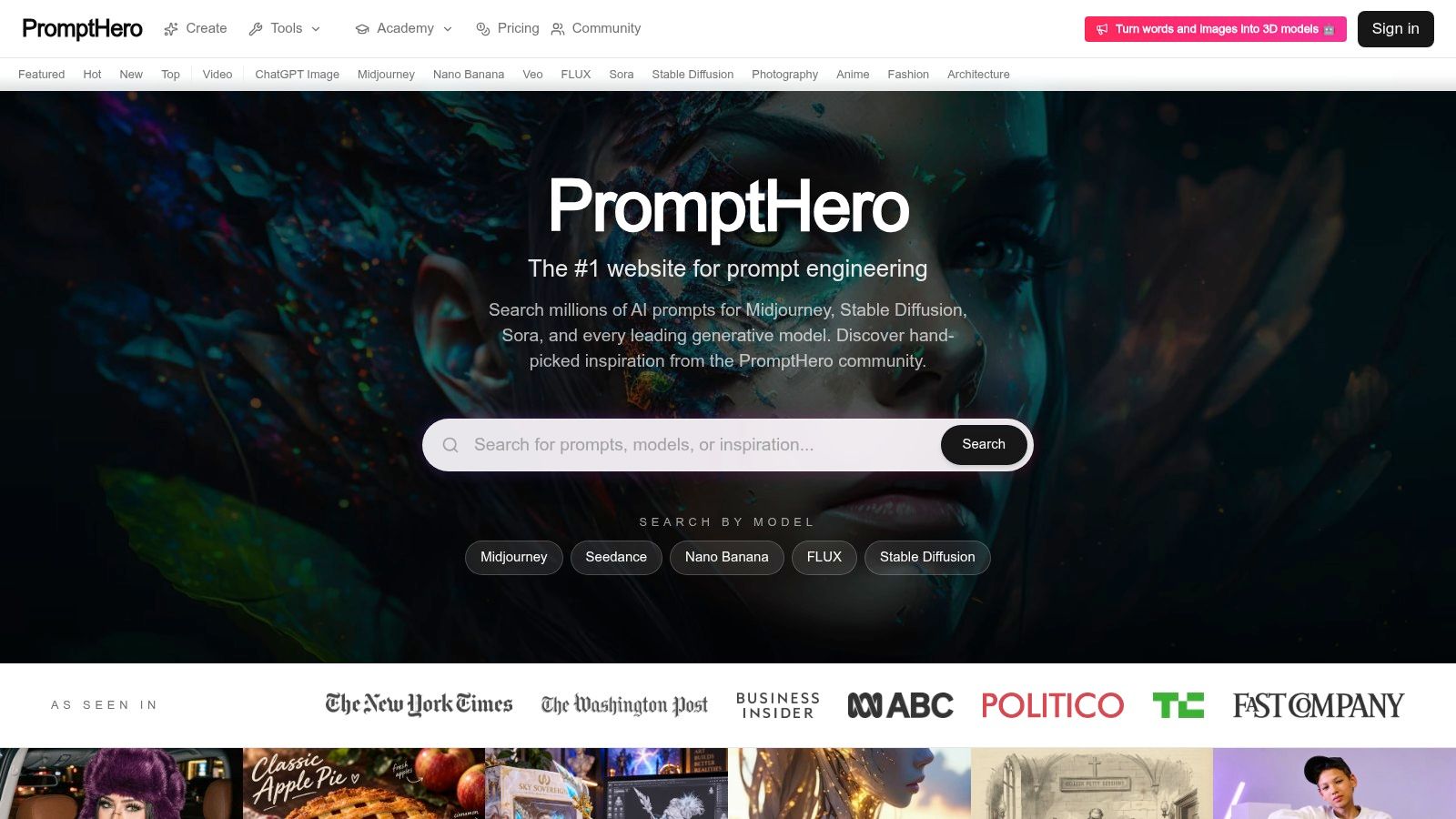
PromptHero is the best fit when the job is finding proven prompts fast instead of writing everything from scratch. Its text-to-image prompt generator sits inside a much larger platform that indexes, organizes, and distributes prompts across major image and video models, including Midjourney, Stable Diffusion, FLUX, Veo, Sora, ChatGPT Image, and others. That breadth matters if you're moving between tools and need a place where prompts, examples, and model context live together.
The value here is not just discovery. PromptHero gives you a searchable catalog, browsing modes like Featured, Hot, New, and Top, plus model-specific collections with parameters and example outputs. For a creator trying to reproduce a look or understand how a model is usually described, that structure saves time. The academy resources and model directory also make it easier to move from inspiration into actual prompt craft without leaving the ecosystem.
Where PromptHero earns its place
Practical rule: Use PromptHero when you need a prompt library with enough context to adapt, not a blank builder that forces you to guess the syntax.
It's especially useful for teams and solo makers who want reusable prompt references. The community layer, creator profiles, and visible engagement signals help surface prompts that other users found useful. The lightweight creative tools, such as album covers, logos, wallpapers, and headshots, are less important than the catalog itself, but they do make quick experimentation easier when you want to test a prompt style in a familiar environment.
The trade-off is that PromptHero is strongest as a prompt and learning hub, not a pure prompt rewrites engine. If you want a one-click transformation of a rough sentence into a polished model-specific prompt, other tools are more direct. If you want a place to study how prompts are being used across models, then PromptHero is one of the most practical starting points.
2. PromptoMANIA
PromptoMANIA works like a guided form for people who want structured prompts without memorizing model syntax. You fill in subject, style, lighting, camera, and mood, then the tool assembles a usable prompt for Midjourney, Stable Diffusion, FLUX, DALL·E, Ideogram, Leonardo, and more. That makes it a strong fit for beginners, for teams that need consistency, and for creators who'd rather avoid formatting mistakes.
The strength of this tool is clarity. It reduces the “what goes where” problem that slows down prompt writing, especially when you're switching between models with different conventions. The themed guides for logo, portrait, product, anime, and cinematic prompts also help if you're building a repeatable template for client work or content production. It's not trying to be a generation suite, it's a prompt assembly layer.
Best use case and limitation
PromptoMANIA is useful when the prompt job is translation from idea to structured input. If your brief says “clean studio product shot, dramatic rim light, premium feel,” the interface helps you map that into a more complete prompt without overthinking the wording. That's a real advantage for teams onboarding newer creators, because the workflow teaches structure while still being fast enough for daily use.
The limitation is equally clear. It doesn't generate images itself, and advanced optimization still depends on your judgment. That means it's ideal for creating the first pass, but not for learning the deeper behavior of a specific model over time. If you're looking for a no-account, copy-paste-friendly builder that prioritizes reliable formatting, PromptoMANIA is one of the cleanest options.
3. PromptPerfect by Beagle
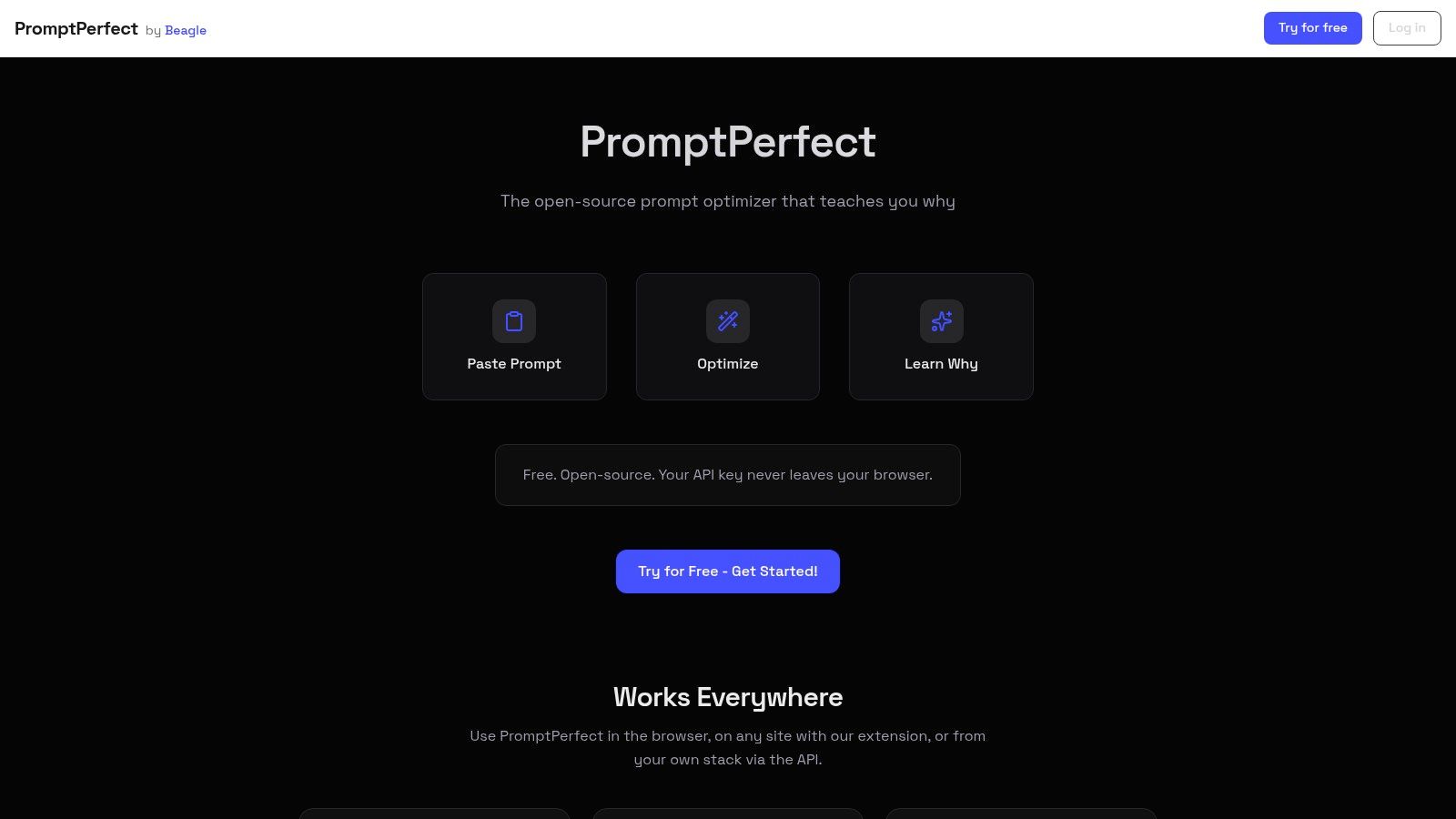
PromptPerfect by Beagle is the right pick when the main job is rewriting rough input into a clearer, longer, model-aware prompt. It's open source under MIT, runs with your API key locally, and offers both a browser extension and an API, which makes it unusually flexible for privacy-conscious workflows or internal tooling. That combination is more interesting than a pure prompt generator because it can sit inside a creator's existing stack instead of forcing a separate destination.
The “Optimize” flow is the obvious draw, but the educational “Learn Why” layer is what makes it stand out. It doesn't just rewrite your prompt, it explains the rewrite. That's valuable for anyone trying to build prompt skill, not just improve a single output. For indie makers building a product around prompt workflows, the API and open-source codebase also make integration easier than with a closed SaaS tool.
Why it works for repeatable workflows
PromptPerfect is most useful when your team needs a privacy-aware prompt improver that also teaches people what good prompt structure looks like.
This is not an image generator, so it doesn't try to replace your creative suite. Its job is narrower, and that narrowness is a strength. If you already know the target model and you want cleaner phrasing, better specificity, and more explainable rewrites, PromptPerfect is a strong fit. It's also useful across websites because the extension can help refine prompts wherever you're working.
The trade-off is that you need your own model or API access, so it's not as frictionless as a single public web app. But for teams that care about keeping keys in the browser, or for developers who want something they can embed into a broader product, it makes a lot of sense. It's one of the most practical choices when privacy and integration matter as much as prompt quality.
4. Microsoft Promptist
Microsoft Promptist is best thought of as a reproducible Stable Diffusion prompt expander rather than a flashy product. It's available as a Hugging Face hosted demo and as a downloadable model, which makes it valuable for people who want a baseline they can inspect, test, or self-host. If your workflow revolves around Stable Diffusion-style prompting, that consistency matters more than having lots of UI bells and whistles.
The appeal is simple. You feed it a short seed, and it expands that seed into a richer prompt designed around Stable Diffusion output quality. That makes it handy for batch enrichment or for comparing how different prompt styles behave when a model gets more descriptive guidance. It also feels like a research artifact, which is useful if you care about repeatability rather than only convenience.
Where it fits and where it doesn't
Promptist is strong when you need a clean baseline for SD-oriented prompt expansion. It's less useful if you want broad model coverage, elaborate controls, or a polished editor with lots of built-in guidance. That doesn't make it weak, it just makes it specific. In practice, specificity is a feature when your production stack already revolves around a single model family.
If you want a dependable benchmark for “short idea in, SD-ready prompt out,” Promptist is worth testing before you commit to a more opinionated tool.
The limitation is scope. It's tuned primarily for Stable Diffusion prompting, so it won't feel equally useful if your actual production model lives somewhere else. But if you're building templates, experimenting with prompt enrichment, or evaluating how much model-specific expansion changes output quality, Promptist is a clean, practical reference point.
5. OpenArt
OpenArt is strongest when you want a single workspace for both prompt generation and image production. Its prompt enhancer rewrites rough ideas into more detailed prompts, and its image-to-prompt tool lets you reverse-engineer reference images into a reusable recipe. That combination is useful if you don't want to move between separate apps just to go from inspiration to output.
The platform is broader than prompt generation alone. It includes image and video generation plus LoRA training, which makes it attractive for creators who want to stay inside one ecosystem. That convenience matters if your workflow is iterative, because you can generate, inspect, reverse-engineer, and refine in one place instead of exporting between tools. For product teams, that can simplify both training and collaboration.
Why integrated workflows matter
OpenArt makes the most sense when the prompt job is not just writing, but closing the loop between a reference and a target visual. The reverse-engineering side helps you turn a style you like into a prompt recipe, while the enhancer helps you polish rough ideas into something more model-friendly. That is especially useful if you regularly reuse art direction across campaigns or social content.
The main trade-off is cost structure. Heavy use can push you into paid credits, so it's better suited to regular production work than casual experimentation. The quality of the enhancer can also vary depending on subject matter, which is normal for tools in this category but still worth testing against your own visual brief. If you want an integrated platform and you're willing to pay for convenience, OpenArt is one of the more complete choices.
6. Krea
Krea is a strong fit for creators who learn best by seeing how prompts evolve in real time. Its image-to-prompt capability is especially useful, because it can stream dense descriptions from reference images and help you understand how camera, lighting, and style language get expressed in a model-friendly way. The platform's exploratory workflow, where you start vague and refine, mirrors how many real creative sessions unfold.
That makes Krea more than a reverse-prompting tool. It's also a learning environment. The guides and model notes help users understand phrasing patterns rather than just copying templates, which is valuable if you're trying to build durable prompt intuition. Side-by-side model comparison is useful too, because the same brief often produces different strengths in different systems.
Good for discovery, not just execution
Krea is especially helpful when you want to discover the prompt behind a look. If you've got a reference image and need to translate it into a descriptive prompt, Krea's workflow supports that kind of visual analysis better than simple text fields do. That makes it attractive for art direction, concept exploration, and creators who iterate visually instead of linearly.
The downside is that some advanced features sit behind paid plans, and the product ecosystem keeps evolving. That can be good for velocity, but it also means you should verify the current feature set before building a process around it. For exploratory work and reference-driven prompting, though, Krea is one of the more capable options.
7. getimg.ai
getimg.ai is built for creators who want a fast improvement loop inside a generation workspace. Its “Improve prompt” feature rewrites rough input into richer, model-aligned prompts, and the surrounding presets make it easy to keep moving without leaving the app. If your production style already leans toward SD or FLUX workflows, that kind of integration is quite useful.
The presets for photography, anime, and art styles help you get to a better first draft quickly, while the how-to materials give you enough context to understand why modifiers and parameters matter. In practice, that makes it a good middle ground between a pure builder and a fully open-ended creative suite. It's not as sprawling as some platforms, which can be a plus if you want fewer choices.
A quick note on workflow fit
The value of getimg.ai is that the prompt fix happens where the image gets made. That reduces context switching, which matters if you're iterating many variations. It's also easier to keep a tight loop between prompt revision and visual evaluation when the same workspace handles both.
The trade-off is credit consumption. The improve feature uses credits, so it's better suited to deliberate production than endless trial and error. It's also more aligned with SD and FLUX-style workflows than with every image model on the market. If you want a prompt improver that lives inside a generation environment, getimg.ai is a strong, practical choice.
For makers comparing adjacent workflows, the Sidehunt project page for GPT Image 2 AI image editor is a useful example of how prompt tools get packaged for launch and discovery.
8. NightCafe
NightCafe is one of the friendlier options if your goal is prompt expansion plus community-driven inspiration. Its Prompt Magic feature rewrites prompts, and Vincent provides daily prompt suggestions that can help when you're stuck or exploring a new style. That combination makes it easier to keep creating without starting from a blank page each time.
The platform also uses templates that append hidden prompt blocks and defaults, which is helpful if you want more structure without manually rebuilding it. Community discovery, contests, and help documentation round out the experience, so it feels less like a single utility and more like a creative environment. For beginners, that lower-friction feel can be more valuable than a highly technical interface.
When NightCafe is the right fit
NightCafe works best for users who want to discover prompts through use, not just construct them. The AI prompt rewriting is useful, but the community and challenge-driven environment are what make it feel sticky. If you need a place to experiment, share, and pick up ideas from others, it's a natural fit.
The drawbacks are familiar. Heavy use means credits, and Prompt Magic doesn't support every model. That means you should verify whether your target model is supported before making it the center of a workflow. For beginners, creative explorers, and teams that value help docs and community support, NightCafe is still a solid contender.
9. MagicPrompt for Stable Diffusion
MagicPrompt for Stable Diffusion is the most straightforward tool in this list for people who want a lightweight prompt expander with wide community familiarity. It takes a short input and turns it into a more creative, richer Stable Diffusion-style prompt. That makes it useful when you want variety quickly, without spending time on detailed template design.
Because it's available through Hugging Face and commonly used in SD toolchains, it's also a practical building block. You can run it locally or host it through Hugging Face, which gives indie makers more flexibility than a closed web app. If your workflow is already centered on Stable Diffusion, this is the kind of tool that saves time every day without much effort.
Best for experimentation, not fine control
MagicPrompt is at its best when you need broader prompt variety rather than a precisely engineered prompt. It expands ideas, it doesn't manage composition rules or workflow context. That makes it useful for brainstorming, for seed generation, and for creating several prompt variants from one rough concept.
Use MagicPrompt when you want to stretch a seed into multiple SD-style directions, not when you need a carefully hand-built prompt with strict syntax control.
The limitation is just as important. It's geared specifically to Stable Diffusion-style prompting, so it's not the best universal tool. But for SD users, it's a dependable option that stays out of the way and does its one job well. For a reverse-image workflow around Stable Diffusion, the Sidehunt page for image-to-image tools is also worth a look if you're building or comparing adjacent products.
10. Perchance AI
Perchance AI is the easiest tool to recommend when the job is frictionless idea-to-prompt prototyping. It includes free, no-login tools like an AI Prompt Generator and an image-to-prompt utility, which makes it useful for quick tests, rough drafting, and reversals without ceremony. If you just want to see whether an idea has enough visual energy to be worth pursuing, Perchance gets out of the way.
The bigger appeal is flexibility. Multiple community front-ends share the same back-end models, so there's a lot of experimentation happening around the core experience. That can be a strength if you like tinkering, because you get a wide range of community-generated tools and variations. It's also handy for early-stage makers who want to prototype prompt interactions before committing to a more polished build.
Why it's useful despite the rough edges
Perchance is not trying to be a cohesive premium suite. That means the quality varies across tools, but it also keeps the barrier to entry low. For fast inspiration, reverse prompt tests, and quick sharing, that trade-off is often worth it.
If you're evaluating tools for a hobby project, an internal concept test, or a lightweight prompt utility, Perchance is a smart place to start. It's free, immediate, and flexible enough to support the messy phase of creative discovery. When you're still deciding what the prompt generator should do, that matters more than a polished interface.
11 Prompt-to-Image Tool Comparison
The right tool depends on the job in your workflow. PromptHero helps you study existing prompts across models. PromptoMANIA and Toolbox Ninja build structured prompts before generation. PromptPerfect and Promptist improve rough wording, while OpenArt and Krea can reverse-engineer visual references. getimg.ai, NightCafe, and Perchance AI keep experimentation inside or close to the generation process.
| Product | Core features | 👥 Target audience | ★ Quality | ✨ Unique / 🏆 | 💰 Price |
|---|---|---|---|---|---|
| PromptHero | Massive searchable prompt catalog + Academy + lightweight creative tools | Creators, prompt engineers, researchers | ★★★★☆ | ✨ Cross-model catalog + learning layer; 🏆 large, structured library | 💰 Free tier + subscriptions |
| PromptoMANIA | Visual, model-aware prompt builder with guided fields | Makers, teams, newcomers who need format-correct prompts | ★★★★ | ✨ Fill‑the‑blanks builder for many models | 💰 Free |
| PromptPerfect (Beagle) | One-click optimize + explanations; extension & API; local with your key | Privacy-conscious users, devs, learners | ★★★★☆ | ✨ "Learn Why" explanations; 🏆 open-source (MIT) | 💰 Free / self-host |
| Microsoft Promptist (Hugging Face) | SD‑tuned prompt expander; hosted Space + downloadable model | Stable Diffusion users, researchers, batch workflows | ★★★★ | ✨ Research-backed SD optimizer; reproducible baseline | 💰 Free demo |
| OpenArt | Prompt enhancer + image→prompt + integrated image/video/LoRA tools | Creators wanting an all‑in‑one generation workflow | ★★★★ | ✨ Reverse-engineer images + end-to-end generation; 🏆 integrated suite | 💰 Freemium (credits) |
| Krea (incl. Krea 2) | Realtime image→prompt streaming; exploratory prompting & model notes | Professionals reproducing looks; advanced prompt learners | ★★★★★ | ✨ Production-grade image→prompt; strong guides & realtime tools | 💰 Freemium / paid features |
| getimg.ai | "Improve prompt" in-generator + presets & guides | Users in SD/FLUX workflows who iterate quickly | ★★★★ | ✨ In‑workspace prompt improvement for fast loops | 💰 Credit-based |
| NightCafe | Prompt Magic expander + daily ideas + templates + community | Beginners, hobbyists, community-driven creators | ★★★★ | ✨ Daily prompt generator + community discovery | 💰 Credits / freemium |
| MagicPrompt (Stable Diffusion) | Lightweight SD prompt expander; widely integrated | Stable Diffusion users seeking quick variety | ★★★★ | ✨ Simple, widely adopted SD-specific expander | 💰 Free / open |
| Perchance AI | No-login prompt generator + image→prompt utilities | Rapid prototyping, testing, frictionless idea‑spitballing | ★★★ | ✨ Instant, many community frontends; no signup | 💰 Free |
| Toolbox Ninja | Parameter-aware builder (Midjourney/DALL·E) with negative prompts | Midjourney / DALL·E users posting to Discord | ★★★★ | ✨ Correctly appends model params; fast copy‑paste | 💰 Free |
For model-specific work, choose a builder that exposes the right fields and parameters. For rough concepts, an expander is faster, but its output may need editing to preserve the intended subject, composition, and style. Reference-driven creators should prioritize image-to-prompt tools, although reverse-engineered prompts still require testing because the original generation settings may be unavailable.
Creators comparing implementation options can also review the Toolbox Ninja directory on Sidehunt. Free tools suit exploration and lightweight prototypes. Credit-based or integrated suites make more sense when prompt generation, image creation, and iteration need to happen in one workspace.
Turn Prompt Generation Into a Repeatable System
The best tool depends on the job you need it to do. Use PromptoMANIA or Toolbox Ninja when syntax and structured fields matter. Use PromptPerfect by Beagle when explanation, privacy, or API integration matters. Reach for Microsoft Promptist and MagicPrompt for Stable Diffusion when you want Stable Diffusion-oriented experimentation. Choose OpenArt or Krea when you need forward-and-reverse visual workflows. Pick getimg.ai or NightCafe when prompt improvement needs to happen inside the generation environment. Use Perchance AI when you just want frictionless prototyping.
The field itself has moved from niche experimentation into mainstream creative work. A 2026 market report estimates the global AI text-to-image generator market at USD 853.81 million in 2025, rising to USD 951.15 million in 2026 and USD 2,513.11 million by 2035, with an 11.4% CAGR over the forecast period, and says the U.S. accounted for nearly 38% of global users in 2025 with more than 11.2 million professionals using these tools for advertising, design, and social media campaigns (Industry Research report). Another industry report projects the broader text-to-image generation market will grow from about USD 1.8 billion in 2025 to USD 12.4 billion by 2033, a 28.3% CAGR (research summary). That growth explains why the workflow question matters more than ever.
A useful testing sequence is straightforward. Define one visual brief. Generate a baseline prompt in the tool you're evaluating. Record the rewritten version. Compare outputs in your target model. Keep the phrases that consistently improve composition, lighting, and style in a reusable template. Before you commit to production, review any credit, API, or self-hosting requirements so the workflow doesn't break at scale.
The research side points to a deeper lesson too. A 2024 to 2025 study found that laypeople could write rich descriptive prompts but often lacked the style-specific vocabulary experienced users rely on, and the correlation between prompt ratings and actual image quality was weak, at r = .29 (study abstract). That means many prompt generators still optimize for wording advice instead of helping users translate intent into model-native language. Another recent line of research frames prompting as a multi-step process, with mixed-initiative systems automatically refining prompts because novices struggle to converge on a target visual (iterative refinement paper). In practice, that means the best tool is often the one that gives you feedback loops, reference-image support, and refinement paths, not just a longer prompt.
If you're building or launching your own prompt tool, Sidehunt is a useful place to reach early adopters. Its weekly Monday competition, structured project pages, launch blog posts, and early-adopter audience can help a focused product get visibility fast, and makers should verify current launch terms at Sidehunt. For everyone else, the cleanest recommendation is simple. Choose the narrowest tool that fits the workflow, then build a repeatable prompt system around it rather than chasing the longest feature list.